
Congregate Members App
for iPhone, iPad, and Android devices
The Congregate Members app puts everything your congregation needs on the phone already in their pocket. Members get the directory, calendar, job assignments, shared files, custom pages, sermon audio, a full-featured Bible, and much more, all built natively into the app instead of buried behind a browser login.
And because no two members use the app the same way, each person can tailor their own dashboard, colors, shortcuts, and settings without affecting anyone else.


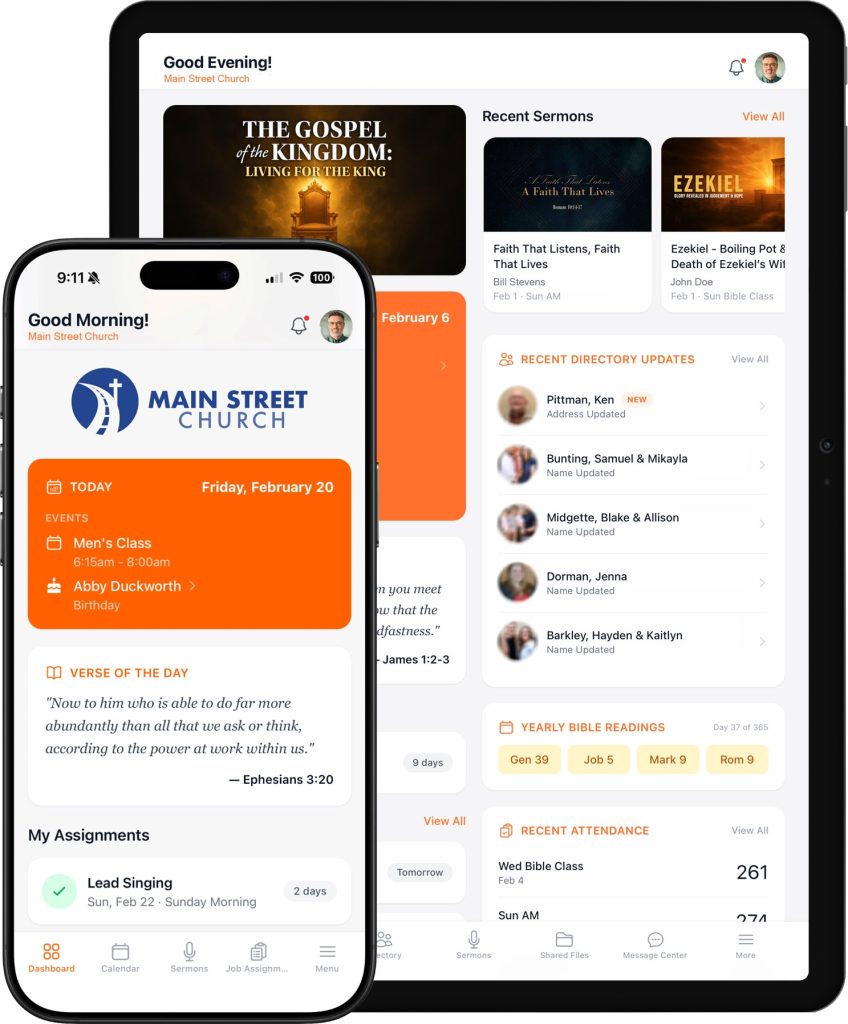
Personalized Dashboard
View today's events and announcements, upcoming assignments, recent directory changes, sermons, daily Bible readings, and more on your personalized feed.
Fully Customizable
Customize dashboard widgets, color schemes, menubar shortcuts, and other preferences to suite your needs.
Member Directory
Browse, search, and reach anyone in seconds with one tap to call, text, email, or get driving directions. Save any family straight to your phone's contacts.
Member Match
Play the built-in member matching game to see if you can name members of your local church. Great for newcomers or those who want to get to know new members.
Congregate Modules
Job assignments, shared files, visitors, attendance, and nearly every other Congregate member module runs natively in the app, so everything feels fast and familiar.
Built-In Bible
Quickly find a Bible passage without ever leaving the app. Choose from multiple translations, including WEB, ASV, and KJV. You can even search and bookmark your favorite passages.
Sermon Audio Player
Listen to sermons and classes directly inside the app with the built-in audio player. The latest sermons appear on your dashboard making them easy to find and play.
Update Your Profile
Manage your directory listing, participation, blockout dates, password, account settings, and more directly in the app.
Full Tablet Support
Layouts adapt to iPad and Android tablets as well as phones of any screen size.
Your Church Family, One Tap Away
The member directory is the feature people open first, and it is built for speed. Start typing and the list narrows instantly, or jump straight down the alphabet with the letter index along the edge. Families appear with photos, so newer members can put a face to a name before they ever say hello, and recent additions are flagged so nothing new slips past you.
Open a family and every piece of contact information becomes an action. One tap places a call, starts a text, drafts an email, or opens driving directions to the house. You can save a family to your phone’s contacts, filter the directory down to a specific group, and pull up former members when you need to reach someone who has moved on.


Never Miss a Sermon or Class
Every sermon and Bible class your congregation records is available in the app, with the most recent message featured right at the top and a full archive below it. Search by title or use the filters to narrow down to a speaker or series.
Playback happens inside the app with the built-in audio player, so there is no jumping out to a browser or a separate podcast tool. The latest sermons also show on the dashboard, which makes catching up on a missed Sunday about as easy as it gets. Members can share sermons by text, email, or social media.
Everything in One Place
The app’s main menu is the complete list of everything your congregation has to offer members, even including custom-built pages and off-site links. Built-in modules like articles, attendance, calendar, class tracker, announcements, directory, job assignments, etc. are all easy to find.
The menu is built from each member’s own permissions, so members only see the modules and pages they have access to. Add a page or module to Congregate and it simply appears in the app, no update required.


Make The App Your Own
No two members use the app the same way. Pick an accent color from the built-in palette or open the color picker and dial in your favorite color. Buttons, icons, and highlights across every screen follow your choice immediately.
The bottom toolbar is yours to assign as well. Choose up to three of the features you access the most; they sit one tap away. Turn off the dashboard widgets you do not need and drag the rest into whatever order matches how you prefer your feed.